AI tools for audiovisual production
It is obvious today, and we have been convinced of it for some time at EuraCreative: artificial intelligence will inevitably impact the jobs, processes, training and daily lives of students, entrepreneurs and employees in our ecosystem.
- Written by Louise Blas

A look back at the first IApéro at Plaine Images, a monthly event conceived by and for professionals in the cultural and creative industries.
For this first edition, we welcomed Julien Frisch, former incubatee, AI consultant, and one of the BPI France referents for the AI Booster France 2030 , and Rémi Auguste, PhD in computer science and founder of the company Weaverize , located at Plaine Images for 7 years.
Generative artificial intelligence offers increasing cost reduction opportunities for the retail sector, major providers of commercial visuals.
Historically, retail companies had to orchestrate photo shoots, involving the transport of thousands of products to locations specially rented for the occasion, staging, lighting management, photography, post-production work… With AI, Rémi Auguste presents in detail the tools he uses to rework the workflow of this substantial production:
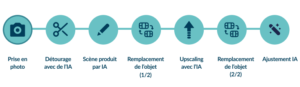
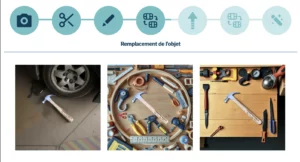
In summary, products are now photographed in a traditional studio and virtually integrated into different contexts using AI solutions. But what tools are needed for each step? A brief overview is in order, with a focus on open-source software:
AI-powered clipping path
It can be done almost instantly thanks to free services on the Internet (a simple search “remove background”) but some tools reach the expected professional standards, such as removebg.
Segment Anything Model (SAM) , a new AI model developed by Meta's R&D department, can isolate any object in any image with a single click, thanks to semantic discrimination. Yolo is a good open-source alternative.
Scenes produced by AI
To create visuals that integrate the photographed product, use Stable Diffusion or Flux . Commercial alternatives include Midjourney , Dall-E , and Stable Diffusion WebUI Forge output rendering characteristics : Flux is a top choice if you want precise control over specific aspects of your output generation.
These tools also handle image upscaling (by adding pixels), which is essential for professional rendering or for certain services, such as printing.
Videos with AI
Multiple solutions exist, but here is a tried and tested selection:
Knowing how to use LoRa
In addition to this first stack of tools, Rémi Auguste offers us a digression on a way to go further with generative models: LoRA.
LoRA stands for Low-Rank Adaptation and refers to a method for creating lightweight sub-models that can be grafted onto existing AI models, such as Stable Diffusion. The advantage? Instead of training a complete model, with its associated data processing requirements, LoRA allows you to add new styles on top of existing models, with only 10 to 20 MB of additional parameters. Training can be done with a minimum of 10 images, giving you control over a small collection of objects.
This fine-tuning approach is appreciated by those who want a well-defined and recognized style (think of the Lego look for example!), with libraries like Hugging Face (among others) offering a selection of pre-designed LoRA.
Generative AI for sound processing
In the field of speech synthesis, progress has been exponential in recent years. The approach of these tools was long concatenative, meaning that phonemes were strung together by copying syllables onto sounds, which was effective but very unnatural. Now, generative AI allows for much more efficient rendering. ElevenLabs is one of the leading tools on the market and includes a multitude of features to give voice to your projects.
Converting text to sound with AI
ElevenLabs allows you to process a stream of text to make it into high-quality audio, which is called text-to-speech.
The tool allows for numerous uses related to voice, by training on your own voice (via a process called cloning) to achieve the most natural sound possible. It therefore allows you to manage:
- “Classic” speech synthesis, with the ability to translate directly into another language
- voice-over and dubbing
- rapid audiobook creation
Voice cloning takes 1.5 to 2 hours, as the model needs to be trained to recognize the voice by providing an audio sample. After that, it's very simple: the tool generates the desired output in seconds.
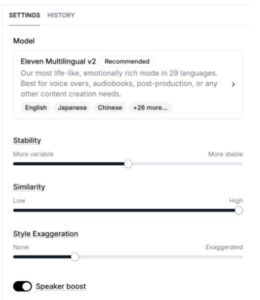
An example of possible settings on Eleven Labs
Lip synchronization with AI
VideoReTalking is an open source model that allows you to edit the faces in a video so that the lips move in sync with new audio.
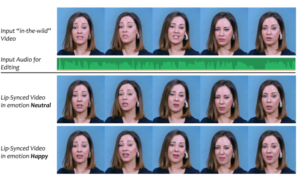
Animating images using video with AI
Several open-source tools accelerate part of the animation process:
- AniPortrait allows you to animate the features of a static image using audio or video.
- Efficient-Live-Portrait allows you to animate the features of an image by cloning the features of a video.
- LivePortrait specializes in painting animation:
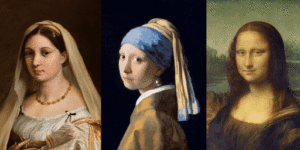
As you have understood, there is a profusion of tools that need to be targeted according to their use: this is one of the aims of the IApéros Plaine Images, but not the only one!
In upcoming meetings, we will focus particularly on a use case, a problem, a virtuous case study or a tool demo… so that this monthly meeting becomes a powerful driver of transformation for audiovisual professionals!